Showing posts with label blogs & blogging. Show all posts

Thursday, 19 December 2024

things I made in November

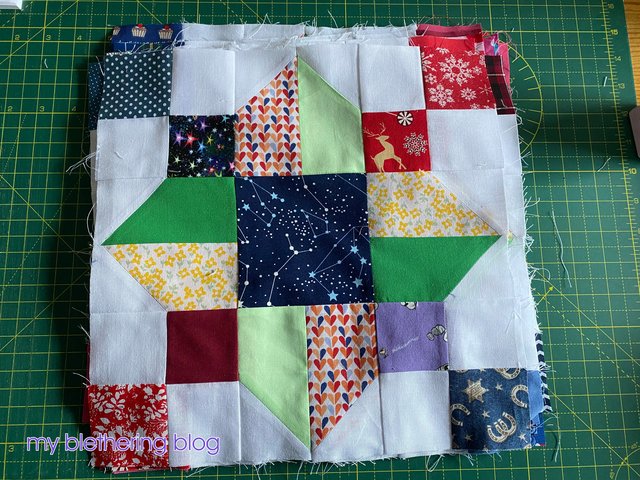
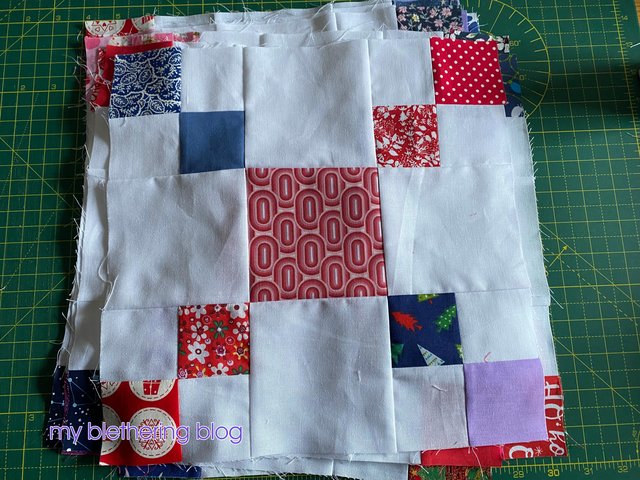
I started the month with some quilt blocks. I can't remember where I saw these blocks as they've been in my "inspirations" folder on my computer for a very long time. The name I have for what will be the completed quilt is "squares and chains" but that didn't lead me anywhere when I tried to find out a source. Oh well, here are the blocks:

I haven't joined these together yet - I suspect that will be a January make.

I then made Douglas some pjs. He needed some new ones so I used up some of the tartan from my stash to make these for him.
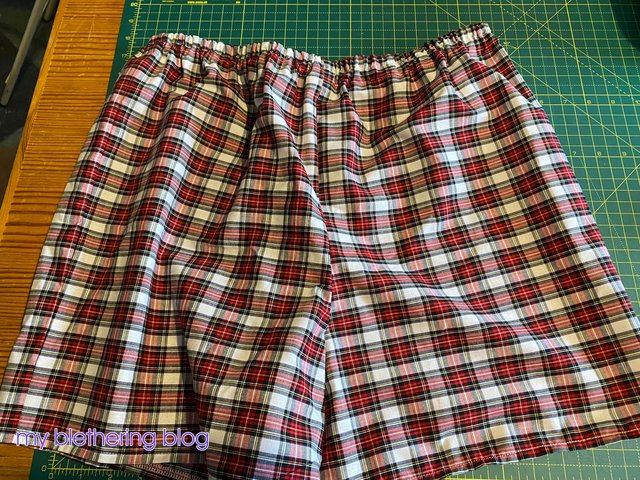
They're already in the rotation and, more importantly, the ones that needed replaced have been taken out of said rotation!

Then I went on a dolls' clothes making binge! First of all a cardigan:
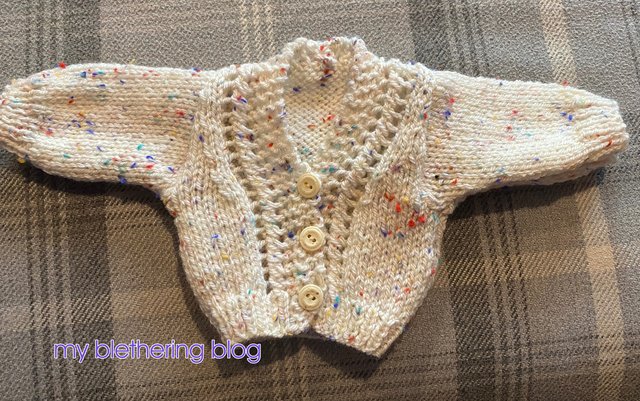
I tried it on Grace. She loves it!
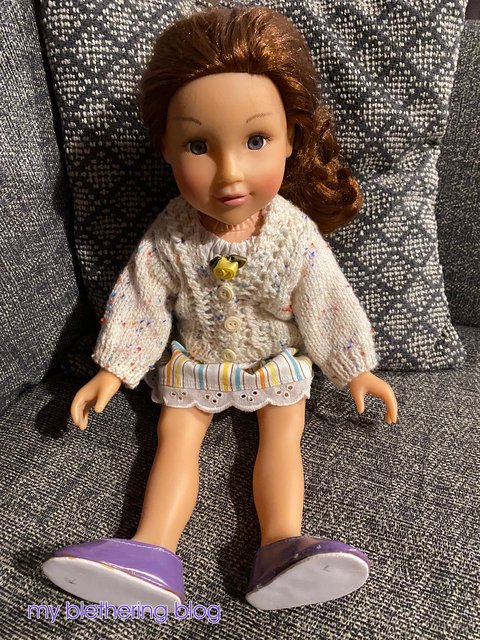
I made another one exactly the same. I haven't shown it because, honestly, it is exactly the same!!

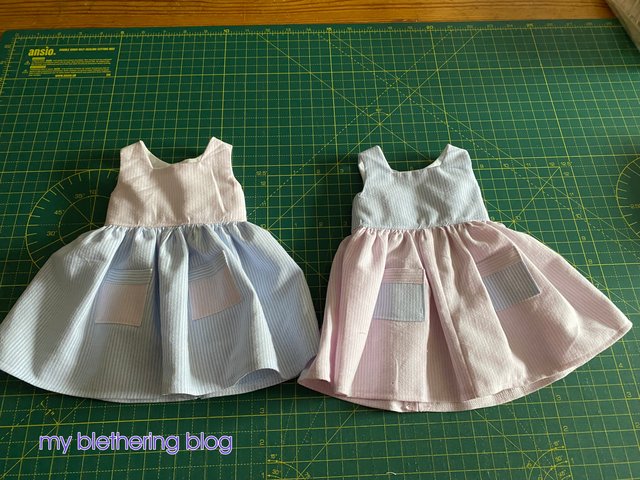
Next I made a couple of dresses out of old shirts of mine. The shirts had seen better days but still had enough decent fabric to make dolls' clothes so that's what I did. The fronts:
The backs:
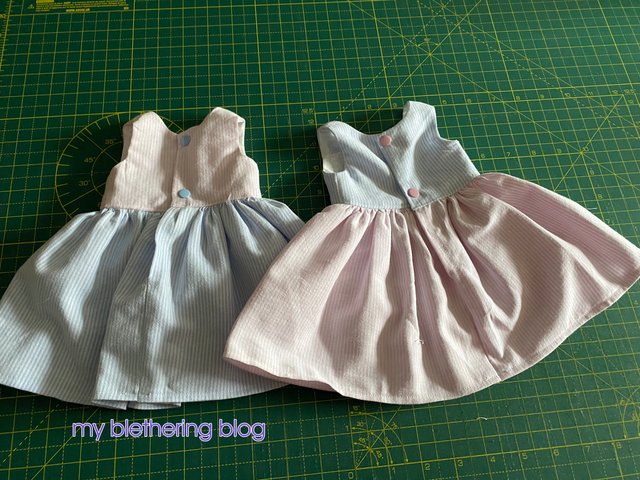
Yet again, Grace loved them!
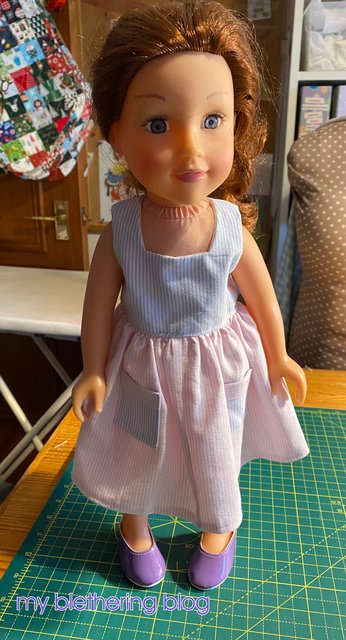
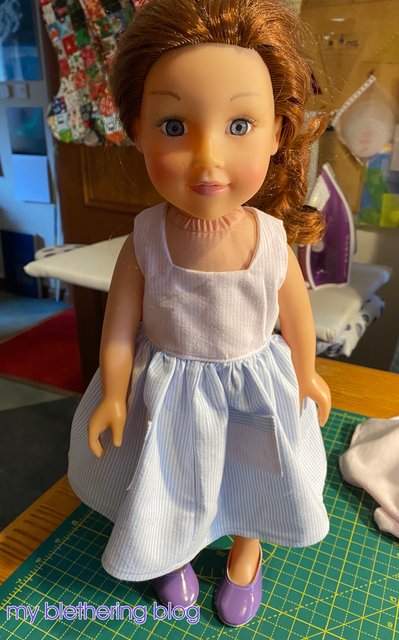
Then I wanted to make an easier dress - sewing dolls' clothes can be very finicky! I couldn't find a pattern in my stash that I wanted to use so I made one up myself. I am so very proud of these!
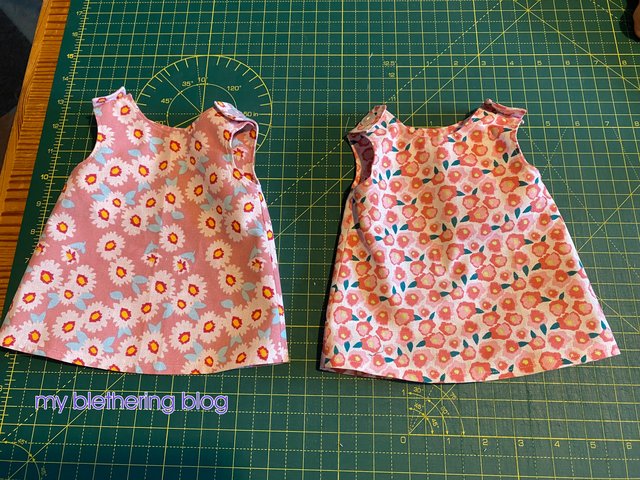
Grace tried them on. They don't quite sit right at her neck because I left her top on and it had a rose in the front which made the dress stick out a bit. Still, Grace loved them!
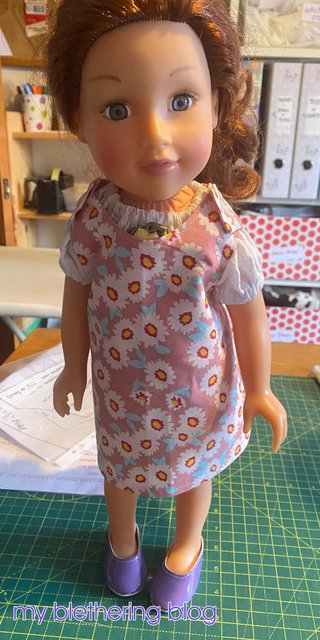
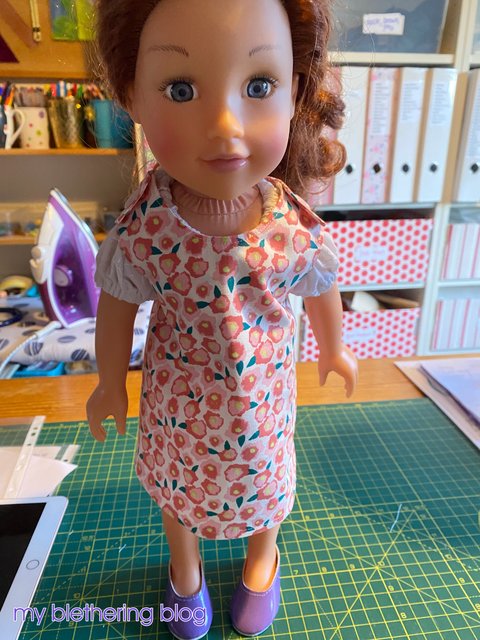
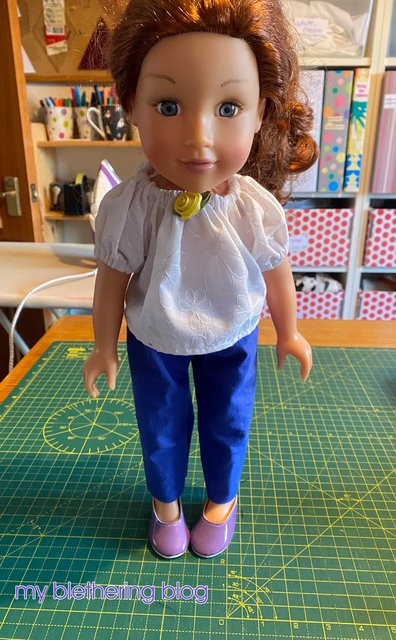
Next, Debbie asked me if I had a pattern for trousers for dolls. I didn't but I did have a shorts pattern so I lengthened that to what I thought would fit Grace then tried it out. It worked beautifully! (You can see the rose I talked about in this photo!)
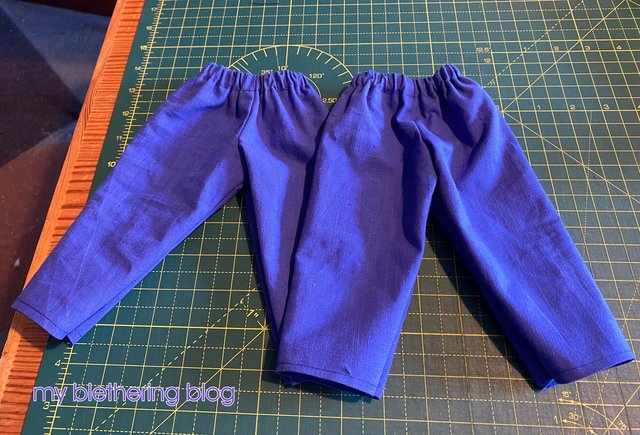
Of course, I had to make 2 pairs of those!
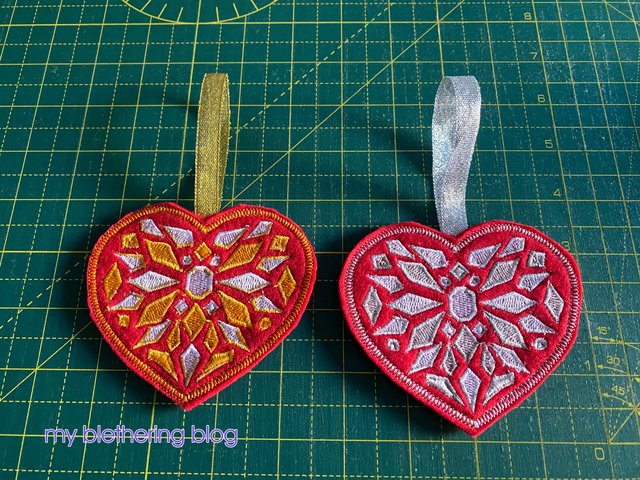
Next I made Christmas ornaments for the girls. This has become a bit of a tradition now and that's fine by me! These are the bejewelled heart ornaments from Embroidery Library.
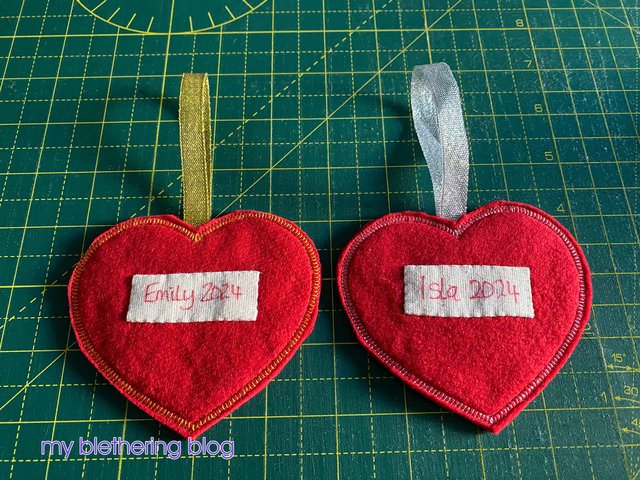
I always put their names on the back so they know which is which!
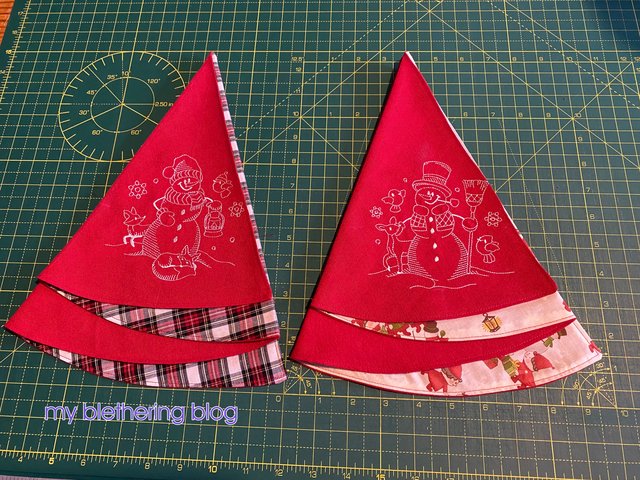
I watched a youtube video of how to make Christmas tree shaped napkins and wanted to have a go. I'd tried a couple of years ago using a different tutorial and they were not good but I thought these ones might work and they did.
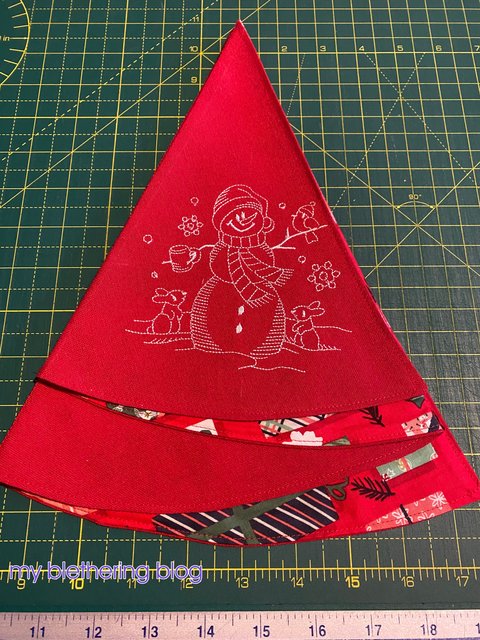
I had to make another 2 so Douglas, Joanna and I could all have one on Christmas Day.
There is another thing I made in November but that's a Christmas gift so will have to wait to be shown later.

Normally, all of these dolls' clothes and the ornaments would have winged their way over the pond to Emily and Isla but Canada Post, in all its wisdom (!!!) decided to go on strike. So our girls won't have all the little bits and pieces I've picked up through the year for their Christmas. It's so disappointing. I sent Debbie money so she could get things from us but it's not the same. Thanks Canada Post!! How selfish could you be?

Oh, and I *think* I might have solved the problem I was having with the comments on here. Blogger, for some reason, wasn't sending me notification of comments so, unless I came on here and looked, I never knew if anyone had commented. Apologies again to anyone who wondered why I was ignoring them! Anyway, fingers crossed that's sorted now. I suppose I'll find out!

I hope to get back with my December makes before the end of the year. I doubt that'll be before Christmas so let me wish anyone who's reading a very merry Christmas. I hope Santa is good to you!
Wednesday, 26 July 2017

hosting problems and some sewing

Last week Joanna sent me an e-mail asking me if I knew what was happening with Photobucket. "No", says I, "what's happening on Photobucket?". Well, apparently, this "hosting site" has decided to stop hosting photos for 3rd party sites. What that means is, if you host your photos for your blog - or website or shop - on Photobucket, they won't show up. Well, they will ... if you sign up for their Plus 500 account which will cost $400 a year. *gasp*

I have a Photobucket account - have done since back in 2004 when I started making signatures on the now defunct iVillage. When I started blogging, I knew how to use Photobucket (and HTML) so I've always written my blog posts in HTML and used Photobucket to host my photos. Now that they've changed their policy about 3rd party hosting all my photos on here will disappear. They'll be replaced with this image that you may have seen on other people's blogs.

When I realised this, I knew I had to do something about it. So, I'm in the very slow process of downloading all my blog photos from Photobucket. I've started at 2017 and am working backwards to 2008. A very slow process indeed. Then, after I've got all my blog photos on my computer, I'll have to go through all my blog posts - all 1144 of them - and change the Photobucket links to either another hosting site or just do them through Blogger. Another very slow process! *sigh*

Okay, enough of that. Let me show you what I've made recently. Let's hope I can work the blogger photo thing!

I finished the quilt top.

I started quilting it this afternoon.

I made a couple of bibs for Miss Emily.

I bought a handtowel out of Asda's for the back - cost me £3. I think I'll get 6 bibs out of the towel so that's 50p each. Add in the teeny tiny piece of fabric for the front and the popper for the neck and that's about 60p per bib. Not too shabby!

I made a fabric box.

I've filled it with my clippies.

I made a couple of lingerie bags for using in the washing machine. The ones I was using were getting a bit tatty. I made these with an odd bit of sheeting that I'd obviously used to test a blouse pattern. One bag came from the fronts and one came from the back!

Lastly, I made another couple of rompers for Miss Emily. I lengthened the body by an inch so that she, hopefully, will get some wear out of them before she grows out of them!

Well, it looks like I managed to do the blogger photo thing so, when it comes to change the photo links in those 1144 posts, I'll at least know what to do! Fun times, eh?

Sunday, 1 February 2015

how to add a linking button to your Blogger sidebar

EDITING TO SAY: As Photobucket has now changed its rules about hosting images for third party sites - ie they don't now do it for free - this post, whilst still correct, needs to have another hosting site used.

Let's say you want to add a button to your blog which people can copy and add to their blog. Not only do you want a button, but you want that button to link back to your blog. How do you do that?

Well, let's assume you've got your button design already. You need to load it into a hosting site. I use Photobucket but there are lots of other hosting sites out there.

Load your button image into your hosting site and make a note of the http code for the image. In Photobucket, they call it the "direct link".

This is the image I'm going to be using for this demo:

The direct link code for this image is http://img.photobucket.com/albums/v679/annelee55/photos/blog%202015/matryoshka.png. You'll see in a minute what to do with this code.

I'm going to make the image link to my blog so I need to get the URL for my blog. That's found in the address bar when I'm on my blog - http://annelee55.blogspot.co.uk.

Okay, I've got my button and its code and I've got the URL for the place I want to link to - my blog. Now I need to get a box where I can put the code. I won't go into HTML details here, just take it from me that this is the code you need to use!

<center><img src="http of button image"><br><textarea rows="5" cols="20"><a href="URL of BLOG" target="_blank"><img src="http of button image"></a></textarea></center>

So, filling in my codes, I get this:

<center><img src="http://img.photobucket.com/albums/v679/annelee55/photos/blog%202015/matryoshka.png"><br><textarea rows="5" cols="20"><a href="http://annelee55.blogspot.co.uk/" target="_blank"><img src="http://img.photobucket.com/albums/v679/annelee55/photos/blog%202015/matryoshka.png"></a></textarea></center>

Okay, so how does that look? Like this:


Okay, fill *your* image code and URL of where you want your image to link to into that first code. Now what? Load it in to your blog.

Note - you need to be logged into your blog. When you're logged in, "design" is at the top right of your blog's navigation bar - beside your e-mail address, "new post" and "sign out".

1. Click on "design".
2. Choose "Layout".
3. Choose "Add a Gadget" at the top of the list on the right hand side - or the left if that's where your sidebar of gadgets is.
4. From the list that appears in the mini window, click on "HTML/Javascript".
5. Paste your code into the Content window - you don't need to add a title if you don't want to (* see below) - and then click on "Save".
6. Your new button and code box will appear at the top of your gadgets list. If you don't want it at the top, drag it to where you want it to sit.
7. Go up to the top of the layout page and click on "Save arrangement".

Your new button and code box will now appear on your blog sidebar.

* If your blog is adamant that it wants a title for your new gadget, just put this code in the title space: <!--space--> and it'll leave it blank. Where it says "space", hit your spacebar.

If you'd like the text area bigger - where the words are that others will copy - just change the 5 and/or the 20 to bigger numbers.

If you want to check that your code is correct before you start loading it into your blog (I *always* check mine!), go here and paste it into the box then click on "see HTML".

I hope that helps. If you have any problems with your code or just want someone else to do the code for you, let me know and I'll be happy to help.

Saturday, 31 January 2015

backing up your Blogger blog

What would you do if your blog was lost? If all the posts and photos just disappeared? Would you cry? I probably would. Then I'd probably kick walls and scream and yell!

But, if you back-up your blog regularly, there's no need to do the kicking and screaming and yelling thing - at least not for losing your blog anyway! Backing up your blog is really easy. Let me take you through how to do it.

Note - you need to be logged into your blog to do any of this stuff. When you're logged in, "design" is at the top right of your blog's navigation bar - beside your e-mail address, "new post" and "sign out".

Back up your template.
Click on "design".
Choose "theme".
Choose the arrow on the right of "customise".
Click on "backup".

A .xml file is downloaded to your computer. Save it. I keep mine in a folder called "blog back-ups" with the date I last did the back-up.

If you're going to try and change your template, please save a copy of it to your computer *before* you start messing with it. That way, if you do something wrong or you just change your mind and want it back the way it was, all you need to do is re-load it back in.

To do that, do the same as above and after you've done the "back-up/restore" bit, choose "browse". Find the .xml file you downloaded, click on it and upload it. Done!

Back up your posts and comments.
Click on "design".
Choose "settings".
Scroll down to "Manage Blog".
Choose "Back up content".
Click on "download".

Again, a .xml file is downloaded to your computer. Save it in the same place that you saved your template.

To re-load them back in, do the same as above but choose the "import blog" option.

I hope that helps! :o)

Tuesday, 29 April 2014

yahoo, blogger comments and I found it, Tilly!

For a few days - maybe even weeks - my yahoo has been rejecting some comments on my blog - most of them my own. It sends me a "delivery status notification (failure)" e-mail telling me that "554 5.7.9 Message not accepted for policy reasons. "

There's a link in the e-mail which tries to explain what's happening but it didn't make much sense to me.

Here's a direct quote from that link:

"We recently changed our DMARC policy to proactively protect our users from increasing email spam that uses Yahoo users’ email addresses from other mail servers. This is an important step to secure our users’ email identities from being used by unauthorized senders. It also interferes with some long-standing uses of identities that are authorized by the user but not verifiable."

Basically what I *think* is happening is yahoo doesn't want me to e-mail people from anywhere other than yahoo. My blog comment which, because it sends an e-mail to the blogger whose blog I'm commenting on, is classifed as an e-mail and is not being sent from my yahoo mail so it's not allowed. Make sense to you? Me neither!

I googled it to see if there was anything I could do about it and none of the answers I read would work for blog comments. What I did notice is that it's not just happening on yahoo. It's also happening for aol e-mails as well. That explains why I don't get an e-mail when my friend Jo from Through the Keyhole leaves a comment on here. I don't suppose she's getting one from me either when I comment on her blog! In fact, I just checked and it looks like my comments aren't even being posted on her blog. Crumbs, Jo. I'm not ignoring you!! I'll sort that in a minute!

Editing in here to say that I just tried to comment on your blog again, Jo, but I got another failure notification e-mail saying that your aol isn't accepting the e-mail so you probably don't even know that I've commented.

From my google search, it's obvious I'm not the only one who's peeved about this but I don't suppose that will make a blind bit of difference. So, I just went into the comments part of my settings and changed my e-mail notification address to a non-yahoo one. We'll see if that helps!

And now, because I can't have a words-only post - it would just be wrong! - here are a couple of funny photos. The first one is of the blanket that normally sits behind me on the couch but, when we came back from our weekend away, it was down on the cushion.

Why was it down there? Well, because Tilly had hidden a doggy biscuit under it!

Silly Tilly! :oD

Monday, 28 April 2014

a fabulous parcel from Freda

On Saturday I got the best surprise in the post. It was a parcel from my blogging friend Freda otherwise known as The Empress of the Universe.

Let me give you some of the background to this story. Freda showed us on her blog in February, a piece of birdy fabric which was just too adorable. I made a comment on a later post that I was so happy to see that same birdy fabric in my local fabric shop BUT it cost £13.99 a metre - the equivalent of approx $21.47 a yard!!! I told Freda I wouldn't be buying any of that fabric any time soon.

Well, Freda e-mailed me telling me I had to send her my address and I wasn't to ask why. I did and I didn't - and anyone who knows me knows how hard that was not to ask her why!

So, on Saturday this parcel arrived and in it was a fat quarter of the same fabulous birdy fabric.

And another fat quarter of another fabulous birdy fabric.

Not only that but each of those had inside them a fabulous co-ordinating fat quarter.

There was also the most fabulous pouch made by Freda - I know she'd made it because I'd admired it on her blog.

But wait! There was another fat quarter inside the pouch!

Isn't it fabulous?

I love the inside of the pouch as well!

And then there was the note included in with all of those goodies.

It reads "for Anne - a friend whose work I admire, who makes me smile, and who has gotten me hooked on cute birdy fabric. Enjoy - Freda".

I've thanked Freda (profusely) already for all my goodies but I want to say it again here. Freda - you're the best! Thanks again and again. :o)

Wednesday, 21 September 2011

basic linking codes

I've read a couple of blogs recently where the writer wanted to put up codes for buttons but couldn't get them to work. I'm no expert in HTML by any means, but I thought I'd post the codes I know here.

The most basic code is this:

<a href="URL of where you're linking TO"><img src="URL of image"></a>

URL you're linking to
This is the web address of the page you want people to land on. It will *always* start with https://. If you use a code that starts with "www.", it won't link properly.

URL of image
You need to have loaded your image into a hosting site and then use the URL that the hosting site gives you for the button. Again, the URL is the code which starts with https://. It *has* to be the URL. No other code will work.

Now, whilst that basic code works beautifully, there is another code which I like to use. It just adds in a couple of features which I think are beneficial.

<a href="URL of where you're linking TO" target="_blank"><img src="URL of button/TAG" title="these show up on hover over"></a>

target="_blank"
This means the link opens in a new window. I like this because people are not directed away from your blog - well, they are but the original window with your blog in it is still open as well.

these show up on hover over
These are words that will show up when people hover their mouse over the image. So you can give clues in these words - or keep them guessing.

For example, hover over this and see what happens -


Then click on it and it will take you - in a new browser window - to a post about something I finished in August - the clue to what it is is in the hover over words. :o)

The code that I used is this:

<a href="http://annelee55.blogspot.com/2011/08/finished-wedding-quilt.html" target="_blank"><img src="https://blogger.googleusercontent.com/img/b/R29vZ2xl/AVvXsEgTBVspVo9Lac-KTL1KvrghrMLwW-Gw38SaZjg9QXYTk6x4atgdarK69qRw3yDqz8OqF7RKjF7RaTpw0G2V7W_Clb7NGsJd73c1LBrc70PO534nN-xA0n8U8zNDXL5siHHjxra1NHH7_Gw/s1600/anne140911.GIF" title="the wedding quilt"></a>

I hope that makes sense! If anyone has any questions, leave me a comment and I'll be happy to help. :o)

Wednesday, 8 September 2010

do you read PW?

Do you read the Pioneer Woman? I do.

I read her blog faithfully. If you'd asked me a couple of years ago if I would be so hooked on reading someone else's blog, I'd have said "No way. Who wants to read about someone else's life and all that's going on in it? Not me".

If you'd asked and I had replied as above, I'd have to admit now that I lied. I *do* want to read about all of that - and more.

I look at her photography part - even though I only use a point and shoot camera. At the moment she's running a photo competition called "Funny". Good for a laugh! :oD

I read the cooking part of her site. I have even made a few of her recipes like her chocolate sheet cake. It is soooooooo good. I must admit, I like the look of the "Pretty Little Brownie Bits" on show today.

I read the Home & Garden part of her blog - just because I can. I even read the Homeschooling part even though I have no children of school age any more - and, if I did, I doubt I would home-school them.

Today, Ree (aka PW aka P-Dub aka The Pioneer Woman) has posted about "Ten Important Things I've learned about Blogging". She is a genius!

I was going to list her suggestions here but I think you need to read her comments under each heading. All I have to say is, I can learn from her suggestions - and hope I do.

Let me just leave you with her number 10.

10. Value every person who takes time out of their day to stop by your blog.

I do, I really do! Thanks for stopping by. :o)

Tuesday, 30 March 2010

a few things

First off, I had nearly 100 visitors on my blog yesterday and today. Most of those are thanks to Anna mentioning me on her blog yesterday. Thanks again to Anna and to all of her fans who jumped over to visit me. It was an amazing feeling to be famous for a day! :o)

Secondly, I had my hospital check-up today for my psoriatic arthritis. Everything is going so well that the consultant doesn't want to see me again until this time next year. And I've only to get my bloods checked every 3 months from now on instead of every month. Fabulous!

Thirdly - believe it or not, it's snowing outside. Crumbs, it's nearly April, my daffodils are finally starting to bloom and it starts snowing? It's crazy! Let's hope it doesn't lie too long!

Finally - Debbie found this photo in her collection and sent it to me. The wind must have been blowing hard the day it was taken! Poor wee Rosie. :oD

Monday, 29 March 2010

I'm famous!!!

Anna over at thimbleanna has mentioned me in her blog today! She made the melting moments and mars bar cakes from my recipes in this post.

How exciting is that?

I looked at the counter 10 minutes ago and it was 7757. I'm going to keep an eye to see how many more people come here today.

If you're here because of Anna's post, I'd love for you to comment and tell me. I can see where you're from in the Feejit thingy. Wow - so many people from all over the place! Fabulous!

Thanks, Anna. You've totally made my day! :o)

Wednesday, 17 February 2010

Beanie's buttons

When I showed off my new blog the other day, Jo asked me if I'd make her one. I asked her what she'd like and she said "buttons".

So today I played around and made her a background, header and divider. Even if I say so myself, I think it's really cool!

Check it out! - Beanie's Blog.

Monday, 15 February 2010

been diddling again!

I've been diddling about with my blog again. This time I made everything myself which pleases me no end! :o)

Luckily, each time I do some diddling, I save the codes and where to put them so I don't have to figure it out every time. Just as well really because, although I do understand some HTML, all that stuff in the codes is eye-crossingly confusing! :oD

Thursday, 7 January 2010

google solved the problem!

As I posted last night, I wanted to expand the white bit in the middle of my blog. I looked at the HTML code and couldn't figure which bit to change. I did change some numbers and nothing seemed to happen. Mmmm

Okay, if you can't figure stuff out, you look it up on google. So I searched for "how do I widen my blog post" and wow - so many results. I read through a few which actually just told people to widen their blogs but didn't actually say how to do it - not very helpful!!

Then I clicked on here - http://bloggeruniversity.blogspot.com/2009/01/widen-post.html. Genius! It just told you which bit to find in the HTML code and which numbers to change.

I used the numbers they suggested - 860 and 610 - but the white bit was actually too wide so I change mine to 810 and 560 and here it is. I'm now a happy bunny! :o)

Now today's problem is italic text. Firefox did an upgrade when I switched on my computer this morning and now every time I post a post or write an e-mail the text is in italics. Not that big a deal but it's annoying.

I wonder if I can find out what to do to sort it on google? Probably! :oD

Edited to add - it did! Apparently I had the wrong fonts as default fonts. I've changed them to what Mozilla/Firefox said they should be and voilà, no italic text. Go me - and go google! :oD

Wednesday, 6 January 2010

new look

I found a link to some blog backgrounds and decided to try one out. I must admit I quite like it.

I would like to make the white bit in the middle wider but have decided that's not a job for this time of night. I was trying to make sense of the HTML codes and my eyes were starting to cross.

Maybe, if I have a look at it tomorrow, it might make more sense to me. Or maybe not! :oD

Thursday, 3 December 2009

It's snowing!!

On my blog header, I mean. Even if I do say so myself, I think it's kinda cool! Well, it would be if it was snowing! LOL

It's not snowing here. It was raining today. That dreich, dark and dismal kind of rainy day where you have to keep the house lights on all day. Ahhhh, the joys of living in Scotland. :o)

Wednesday, 12 August 2009

of all the blogs in all the world …

I've said before that I love to blog hop - go to one person's blog, read it and then move on to the blog of someone they have in their blog list. Well, let me tell you what happened yesterday!

I went to attic24 and then, from her blog list, chose to visit MarmaladeRose. I have no idea why I chose that blog but I did so I sat and read her latest post which had photos of a car journey home through the Yorkshire Dales - fabulous!

I looked at the photos, giggled at her commentary "OOO! Look! another car!"and, when her camera battery died on her "Oh bum!".

So what? I hear you say. Well, I scrolled on down and was looking at the photos of her patchworks using vintage embroidered linens - what a fabulous idea! - when Douglas strolled into the dining room.

"What're you looking at?" he says so I showed him thinking his eyes would glaze over and he'd walk away wondering why anyone would want to make anything by cutting up something else and sewing it back together again.

He didn't. He said "We have a photo of that exact same river from that exact same place". I just looked at him and said "what?" thinking he'd finally lost it.

He rushed off to the living room where I could hear him muttering about holidays to York and we had lunch in such and such a place and didn't I remember? "(Em, no! It was, at a guess, 5 years ago. You expect me to remember where we had lunch one day 5 years ago?)

So, anyway. A few minutes later, he called me through to see the photo and - wow! it is the same river from the same place!


How cool is that?

Of all the blogs in all the world …

I'm going to go and leave a comment on MarmaladeRose's blog with a link to here - just so she can think "how amazing is that?" too! :o)

Wednesday, 5 August 2009

take a look at this!

I don't know if any of you have clicked on any of the blogs in my blog list. Just in case you haven't, you need to look at the one called Attic24. I'd hate for you to miss the beautiful colours and sheer gorgeousness of this blanket.

It makes me want to dig out my crochet hook and find the yarn in the spare room. Mind you, that's a non-starter at the moment as said spare room is FULL of not only Debbie's stuff but Joanna's as well.

Oh well, I'll just have to admire Lucy's blanket and dream of making one of my own … one day … when I get my spare room back … hopefully soon!

Friday, 17 July 2009

wandering through sewing-blog-world

I've been doing a lot of wandering through sewing-blog-world recently. You know - you find a link on someone's blog and go and look at the blog that's linked.

Then you click on a link on her blog and go and look at that blog. And so on and so on. Before you know it, it's bedtime and you have a million Firefox windows open with sewing blogs on them!

So, you go back, bookmark them all so you can do the same thing another day - probably too close to bedtime - and you end up bookmarking another gazillion blogs!

It's fun, though, and - very important - it's not fattening!

So - or maybe "sew" - hats off to all you sewing bloggers who show what you make and inspire the rest of us. Thanks for sharing your talents with us. :o)

Friday, 19 June 2009

a new header to match!

Wow and wow again! I made new blog header and managed to get it to fit in without any help from any tutorial! Some days I just amaze myself! LOL

Thursday, 18 June 2009

wow! it worked!

I've been messing trying to make a new background for my blog. I used the tutorial here which I played around with and made slightly different. (If the day ever comes when I follow a tutorial/recipe/sewing pattern word for word, watch out for blue snow!!)

Anyway, when I tried to upload it the other day it wouldn't work. No matter what I did, my wee starry bit and stripey bit wouldn't show up. Grrrr

So, tonight I tried again. I'm 99% certain I did everything the same as the other night but that 1% made all the difference because it worked. Woohoo!

I'm going to have to get rid of the balloons at the top because they don't quite go with the starry bit and the stripey bit and, if you know me even slightly, you'll know that I like things to match. Avatars, text colours *have* to match my siggies. Yes, it is sad! LOL

But in the meantime, I'm just going to admire the starry bit and the stripey bit and pat myself on the back for managing to get it to work!